



Skip to content
Appraise
  • Surveys
  • Evaluation
  • Methodologists
  • Other Tools
    • Development Plans
    • OKR
    • Org Chart
    • Engagement Survey
    • Gamification
    • Feedback
    • Career Tracks
    • Competency Library
  • HR Journal
Appraise
  • Surveys
  • Evaluation
  • Methodologists
  • Other Tools
    • Development Plans
    • OKR
    • Org Chart
    • Engagement Survey
    • Gamification
    • Feedback
    • Career Tracks
    • Competency Library
  • HR Journal

Appraise Update: Goal Management with OKR

  • Главная
  • HR Journal
  • Goal Setting
  • Appraise Update: Goal Management with OKR
Breadcrumb Abstract Shape
Goal Setting

Appraise Update: Goal Management with OKR

  • 19 Feb, 2025
  • 0
Модуль OKR появился на платформе Appraise
The OKR (Objectives and Key Results) framework has proven to be an effective tool for managing goals and improving team productivity. Appraise now enables you to set and track goals using the OKR framework in a convenient, intuitive format.

What the Goals module is for
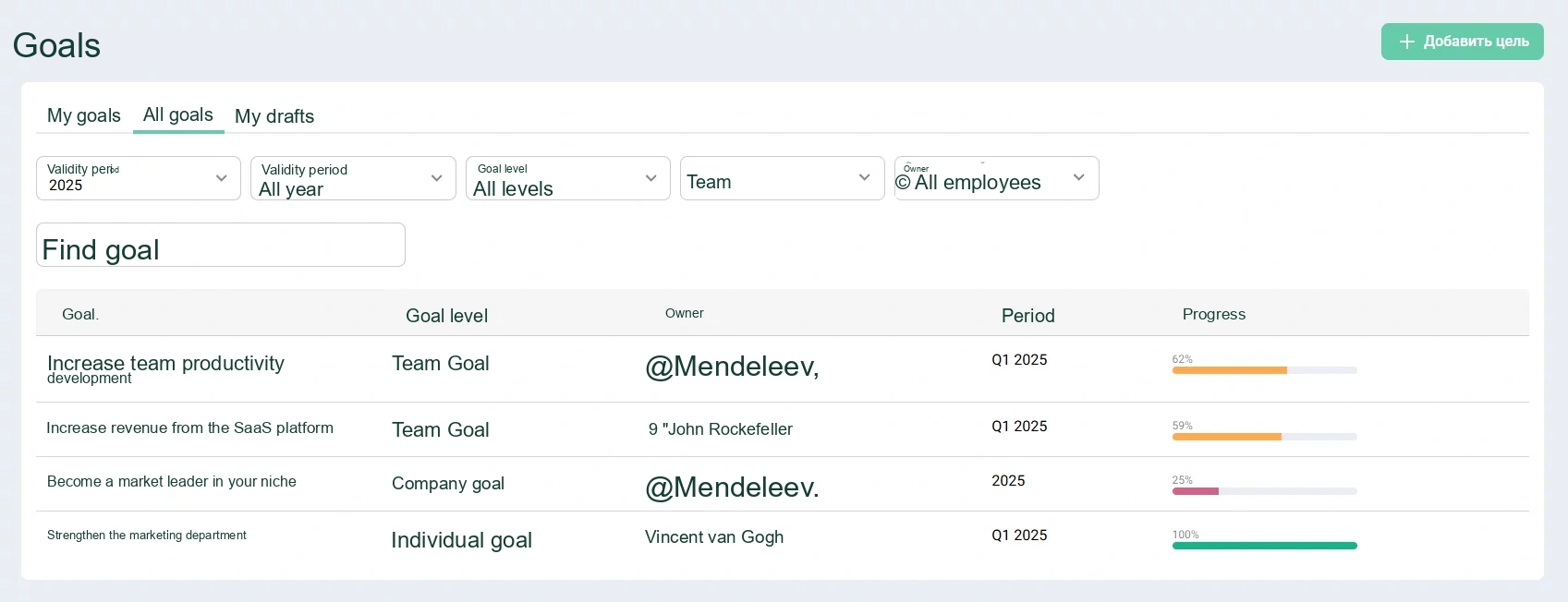
Goals in Appraise is a flexible tool that simplifies setting and tracking goals at every level of the company. It is designed for teams of any size and is ideal for companies seeking greater transparency and efficiency.
Главный экран модуля Цели в Appraise

Goals module home screen

The module is based on the OKR framework, which involves setting objectives and breaking them down into key results (KRs). The team defines an objective and specifies the key results that must be achieved to accomplish it.

A clear visual representation of goals helps managers and employees align their efforts, stay focused on priorities, and track progress in real time. Let us explore the key aspects and capabilities of setting goals in Appraise.

Three levels of goals

Appraise allows you to create goals at different levels:

  • Individual — focused on an employee’s personal development or completion of specific tasks.
  • Team — help coordinate work within departments.
  • Company-wide — support the achievement of the company’s strategic goals.
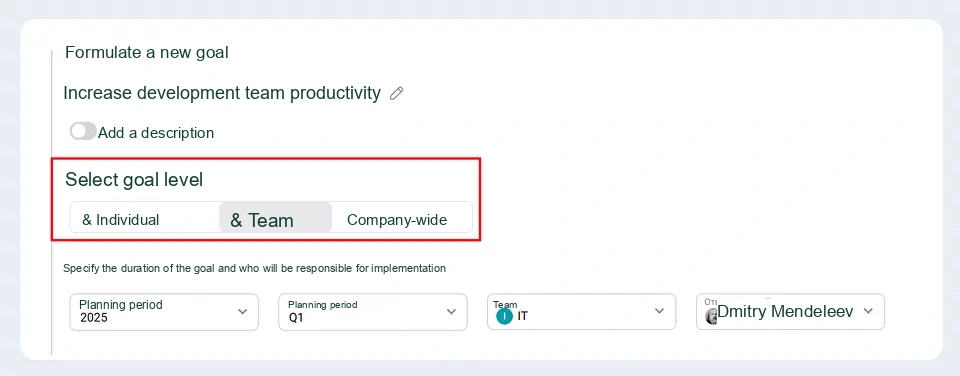
В Appraise можно создавать командные, корпоративные и индивидуальные цели сотрудника

Example of creating a team goal

The ability to select a goal level makes the system versatile and convenient for every employee and team. Focus on ambitious plans for company-wide growth or use the module as an IDP (individual development plan) to track an individual employee’s progress — Appraise will support you at every stage.

Three types of key results

Each goal in the system includes key results that help measure progress and achievements. Appraise offers three types of key results:

  • Percentage — progress toward the result is measured as a percentage.
  • Numeric — the result is tied to a specific metric, such as the number of leads or sales volume.
  • Completed/Not completed — used for tasks without quantitative metrics.

A range of metric types makes planning more flexible and easier for owners to understand.
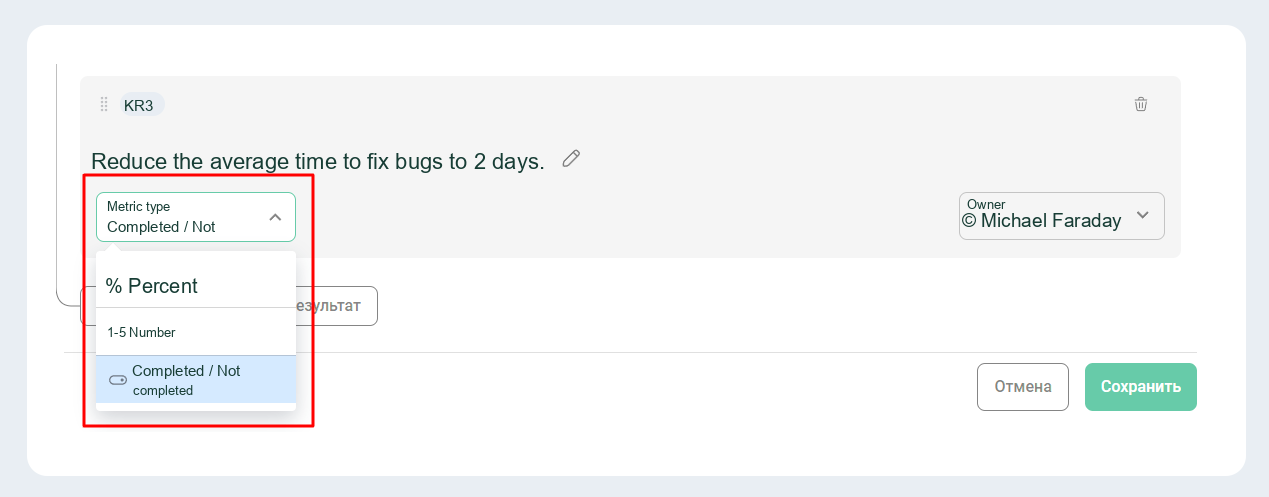
В Appraise можно выбрать метрику, по которой будет оцениваться выполнение OKR

Metric selection window for tracking results

Flexible planning and historical data
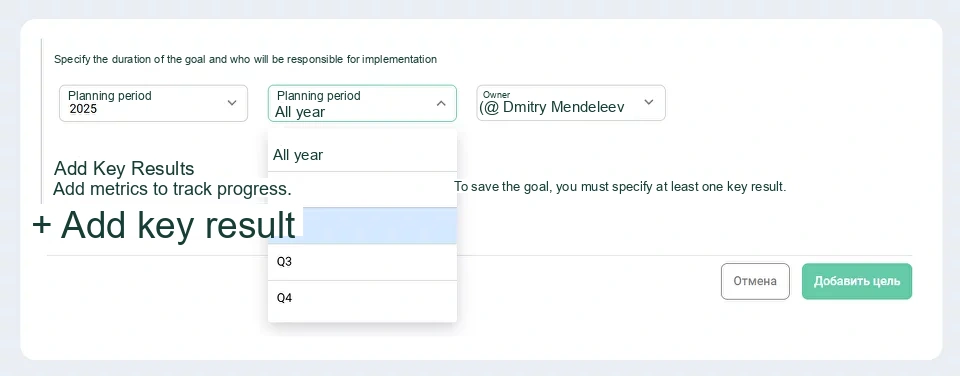
Set goal deadlines by selecting a year and a specific quarter. This allows you to tailor OKRs to the company’s long-term or short-term strategies.
В Appraise можно задавать сроки выполнения целей

Configuring the goal period

All goals remain in the system even after they have been achieved, allowing you to plan new goals based on previous experience. You can also import historical goal data from other platforms or documents to gain a complete view of your achievements.
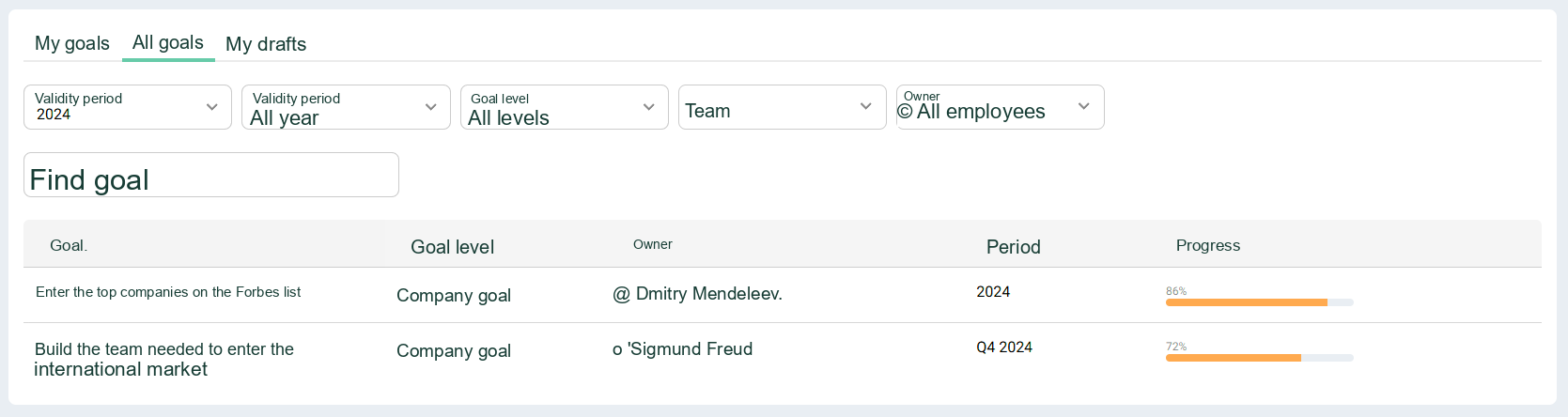
В Appraise можно смотреть цели за разный период - в том числе за прошедший год

Viewing goals for 2024

Responsibility for key results

An owner must be assigned to every goal and key result. A goal always has a single owner, regardless of its level. For individual goals, this person is also assigned as the owner of the key results.

For team and company-wide goals, however, responsibility for achieving key results can be distributed among several employees. Assigned employees can track progress and update the data for their key results.
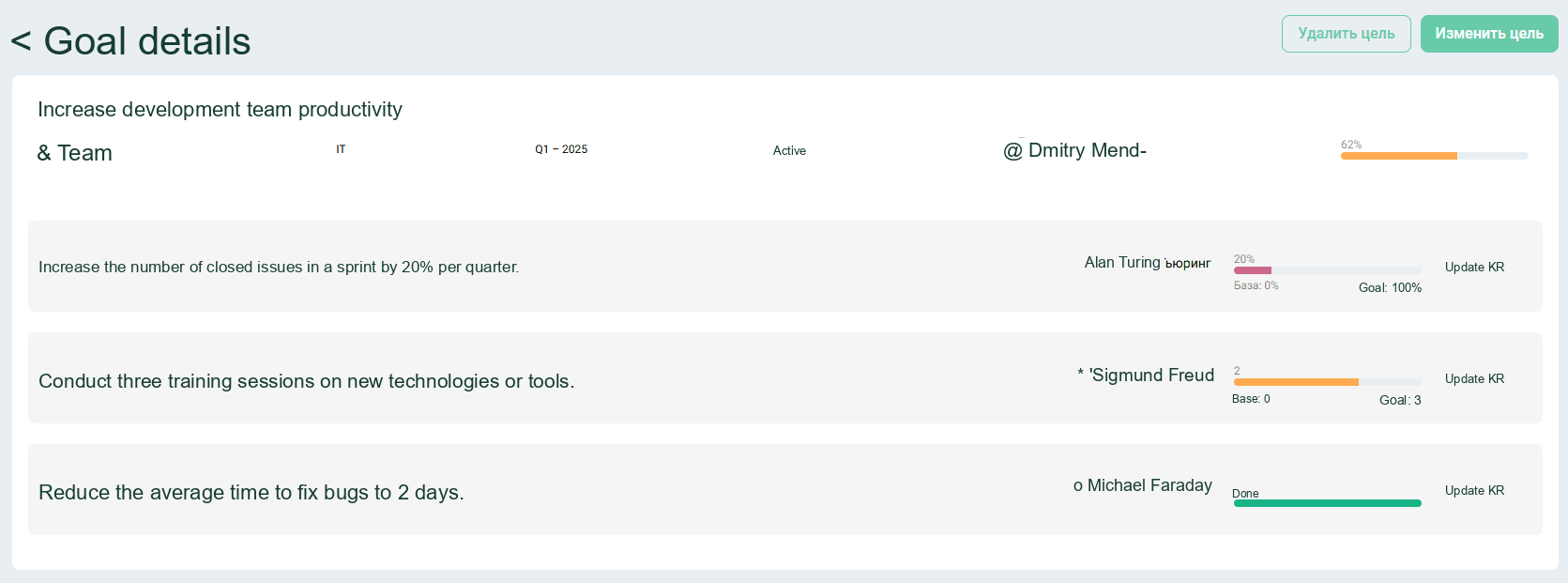
В Appraise удобно назначать ответственного по каждой цели

Each key result of a team or company-wide goal can have its own owner

Progress tracking dashboard

Once goals have been set, all information is automatically displayed on the dashboard. The following filters are available for convenient sorting:

  • By year and quarter.
  • By goal level (individual, team, or company-wide).
  • By team or owner.


This allows managers, HR professionals, and employees to stay informed about the current status of tasks and respond promptly to changes.
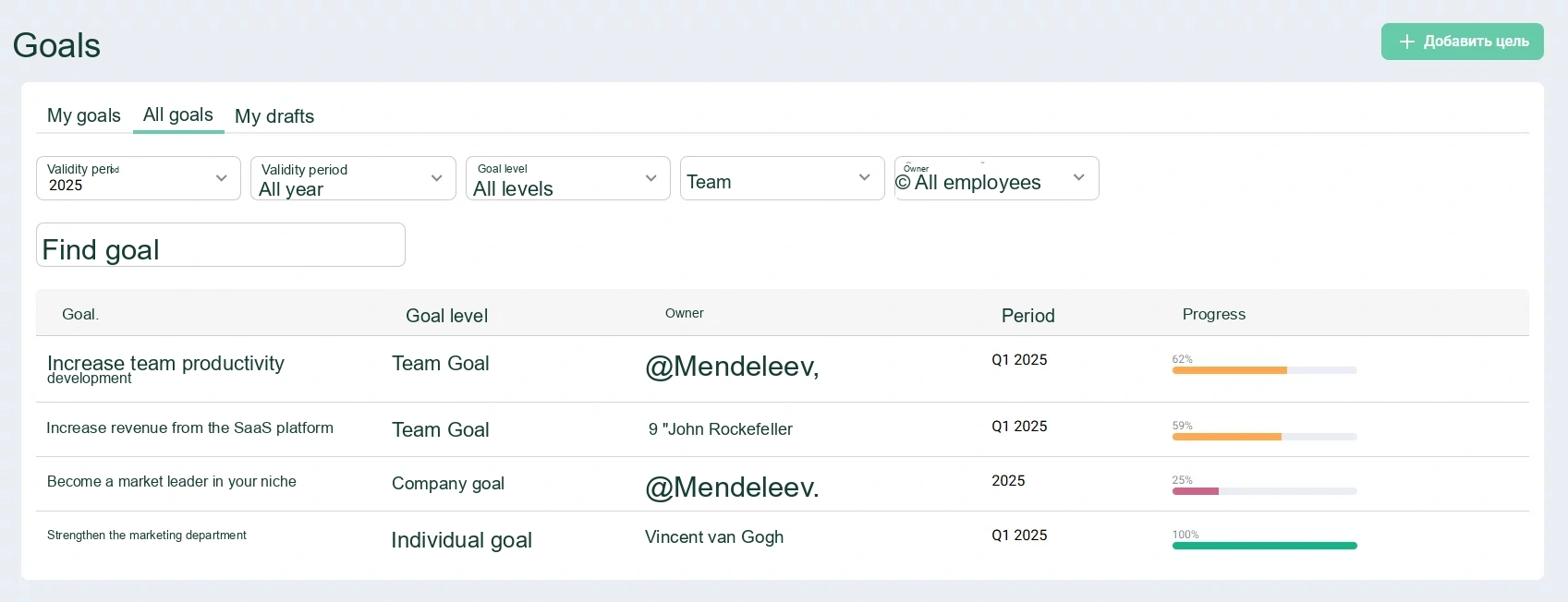
Все цели и прогресс по ним — в одном пространстве

The home page shows goals at every level and their progress

Why use the OKR module in Appraise

  • Process transparency. All goals and results are always available in one place.
  • Flexible configuration. You can easily tailor OKRs to your company’s needs.
  • Higher engagement. Assigning owners and providing regular updates keeps everyone informed about progress.

Join us for a platform demo

And learn more about goal-setting capabilities and applying the OKR framework in Appraise

Share on:
How to Encourage Employees to Complete Surveys
Grow Like Google: Why and How to Implement OKR in Your Company
Appraise

Appraise – an HR platform for employee surveys, assessments, and development

Read our HR Journal

Platform
  • Surveys
  • Evaluation
  • Development Plans
  • OKR
  • Methodological Support
  • Feedback
  • Org Chart
  • Engagement Survey
  • Gamification
  • Competency Library & Career Tracks
Contact us

partners@appraiseteam.com

APPRAISE LAB sp. z o.o.
ul. Tadeusza Czackiego 15/17
00-043 Warszawa, Poland.

Appraise